Version: 1.0.1 (Production Ready) Architecture: Serverless Monolith (Dockerized Lambda) Frontend: Next.js (Ghost Admin Customization)
- Requirements Overview
- Overview of Serverless Monolith Pattern
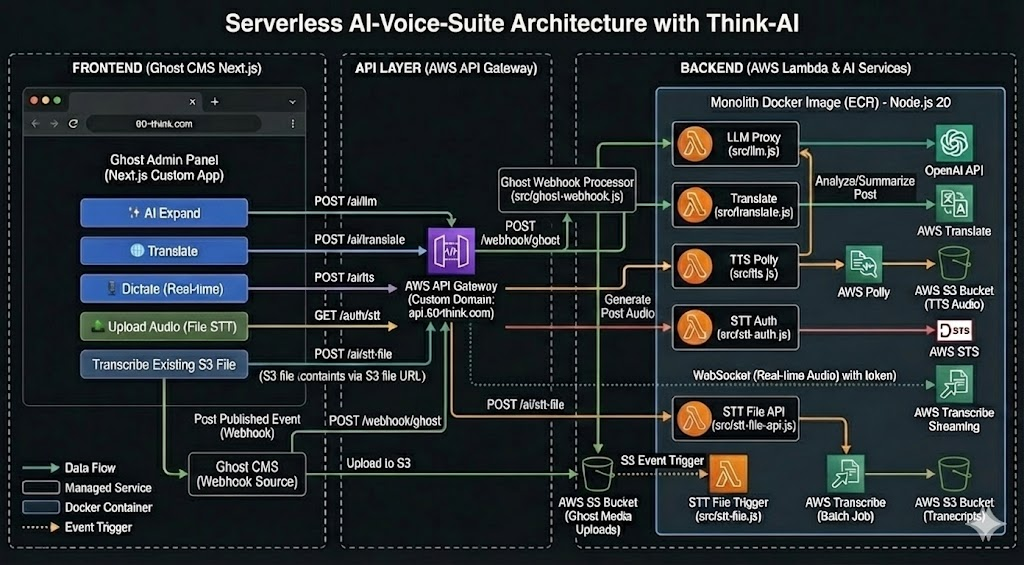
- Key Workflows (Interactive, Webhook, File STT)
- Architecture Diagram Reference
2. Project Structure
- Directory Tree Layout
- Key File Descriptions
3. Source Code (Backend)
- 3.1 Dependencies (
package.json) - 3.2 Dockerfile (The Monolith Build Definition)
- 3.3 Lambda Handlers (
src/*.js)- A. LLM Agent (
src/llm.js) - B. Translation (
src/translate.js) - C. Text-to-Speech (
src/tts.js) - D. Real-time STT Auth (
src/stt-auth.js) - E. STT File Trigger (
src/stt-file-api.js) - F. Ghost Webhook (
src/ghost-webhook.js)
- A. LLM Agent (
4. Deployment Steps (Backend)
- Step 1: Create Makefile (Automation Script)
- Step 2: Create Infrastructure (First Run Setup)
- ECR Repository & Image Push
- Lambda Creation & Configuration
- API Gateway Routing
5. AWS Configuration Checklist
- IAM Role Permissions (Polly, Translate, Transcribe, S3)
- Environment Variables (Keys & Buckets)
- Function URLs & CORS (Testing Configuration)
6. Frontend Integration (Next.js)
- 6.1 API Configuration Strategy (Custom Domain vs. Lambda URL)
- 6.2 Environment Setup (
.env.local& Base URL) - 6.3 React Hook Implementation (
useAiTools.ts- Unified Gateway Version) - 6.4 Custom Domain Setup
- ACM Certificate Request
- API Gateway Domain Mapping
- DNS CNAME Configuration
- 6.5 React Hook Reference (Alternative/Legacy Implementation)
- 6.6 Test Component (
AiTestConsole.tsx- Developer UI)
1. Requirements Overview
This project enhances a custom Next.js Admin Panel for Ghost CMS with a suite of AI capabilities, including real-time tools and automated background processing.
Interactive Features (Frontend Triggered)
- AI Assistant (LLM): Generate, expand, or summarize content via OpenAI (proxied).
- Text-to-Speech (TTS): Convert article text to audio (MP3) via Amazon Polly.
- Translation: Translate selected text instantly via Amazon Translate.
- Real-time Dictation (STT): Stream microphone audio directly to Amazon Transcribe via WebSocket for live transcription in the editor.
- File Transcription (STT - Two Modes):
- Mode A (Upload): User uploads a new audio file to S3, triggering transcription automatically by S3 trigger.
- Mode B (Existing File): User uploads a new audio file or selects an audio file already present, triggering transcription via API call without re-uploading (file already exists in S3).
Automated Features (Background Triggered)
- Post Auto-Processing (Webhook): When a post is "Published" in Ghost, a webhook triggers AWS Lambda to automatically generate a TTS audio version of the entire post via Amazon Polly.
2. Project Structure
Create this exact directory structure.
ai-voice-suite/
├── Makefile                   # Automation scripts
├── Dockerfile                 # The "Monolith" Image definition
├── package.json               # Backend dependencies
├── .env                       # Local secrets (AWS keys, OpenAI key)
└── src/
    ├── llm.js                 # OpenAI Text Gen
    ├── translate.js           # AWS Translate
    ├── tts.js                 # AWS Polly (Interactive)
    ├── stt-auth.js            # Real-time Mic Auth
    ├── stt-file-api.js        # API Trigger for File Transcription
    └── ghost-webhook.js       # Auto-TTS for Ghost Posts
3. Source Code (Copy & Paste)
3.1 Dependencies (package.json)
JSON
{
  "name": "ai-voice-suite",
  "version": "1.0.0",
  "main": "src/llm.js",
  "type": "commonjs",
  "dependencies": {
    "@aws-sdk/client-polly": "^3.400.0",
    "@aws-sdk/client-s3": "^3.400.0",
    "@aws-sdk/client-transcribe": "^3.400.0",
    "@aws-sdk/client-sts": "^3.400.0",
    "@aws-sdk/client-translate": "^3.400.0",
    "openai": "^4.0.0"
  }
}
3.2 Dockerfile (The Monolith)
Dockerfile
# Use AWS Lambda Node.js 20 Base Image
FROM public.ecr.aws/lambda/nodejs:20

# 1. Install Dependencies
COPY package.json ${LAMBDA_TASK_ROOT}
RUN npm install --omit=dev

# 2. Copy Source Code
COPY src/ ${LAMBDA_TASK_ROOT}/src/

# 3. Default Command (Will be overridden by AWS Lambda configuration)
CMD [ "src/llm.handler" ]
3.3 Lambda Handlers (src/*.js)
A. LLM Agent (src/llm.js)
JavaScript
const OpenAI = require("openai");
const openai = new OpenAI({ apiKey: process.env.OPENAI_API_KEY });

exports.handler = async (event) => {
    try {
        // Parse body from API Gateway (event.body is a string)
        const body = JSON.parse(event.body || "{}");
        const { prompt, task, context } = body;

        let systemMsg = "You are a helpful assistant for a blog editor.";
        if (task === 'expand') systemMsg = "Expand these notes into a professional paragraph.";
        if (task === 'headline') systemMsg = "Generate 5 SEO-friendly titles.";

        const completion = await openai.chat.completions.create({
            model: "gpt-4-turbo",
            messages: [
                { role: "system", content: systemMsg },
                { role: "user", content: `Context: ${context || ''}\n\nTask: ${prompt}` }
            ]
        });

        return {
            statusCode: 200,
            body: JSON.stringify({ result: completion.choices[0].message.content })
        };
    } catch (e) {
        return { statusCode: 500, body: JSON.stringify({ error: e.message }) };
    }
};
B. Translation (src/translate.js)
JavaScript
const { TranslateClient, TranslateTextCommand } = require("@aws-sdk/client-translate");
const client = new TranslateClient({ region: process.env.AWS_REGION });

exports.handler = async (event) => {
    try {
        const { text, targetLang } = JSON.parse(event.body || "{}");

        const command = new TranslateTextCommand({
            Text: text,
            SourceLanguageCode: "auto",
            TargetLanguageCode: targetLang || "es"
        });

        const response = await client.send(command);
        return {
            statusCode: 200,
            body: JSON.stringify({ translated: response.TranslatedText })
        };
    } catch (e) {
        return { statusCode: 500, body: JSON.stringify({ error: e.message }) };
    }
};
C. Text-to-Speech (src/tts.js)
JavaScript
const { PollyClient, SynthesizeSpeechCommand } = require("@aws-sdk/client-polly");
const { S3Client, PutObjectCommand } = require("@aws-sdk/client-s3");

const polly = new PollyClient({ region: process.env.AWS_REGION });
const s3 = new S3Client({ region: process.env.AWS_REGION });

exports.handler = async (event) => {
    try {
        const { text, voiceId } = JSON.parse(event.body || "{}");
        const bucket = process.env.AUDIO_BUCKET;
        const key = `tts-interactive/${Date.now()}.mp3`;

        const { AudioStream } = await polly.send(new SynthesizeSpeechCommand({
            Text: text,
            OutputFormat: "mp3",
            VoiceId: voiceId || "Joanna",
            Engine: "neural"
        }));

        // Convert stream to buffer
        const chunks = [];
        for await (const chunk of AudioStream) chunks.push(chunk);
        const buffer = Buffer.concat(chunks);

        await s3.send(new PutObjectCommand({
            Bucket: bucket,
            Key: key,
            Body: buffer,
            ContentType: "audio/mpeg"
        }));

        return {
            statusCode: 200,
            body: JSON.stringify({ url: `https://${bucket}.s3.amazonaws.com/${key}` })
        };
    } catch (e) {
        return { statusCode: 500, body: JSON.stringify({ error: e.message }) };
    }
};
D. Real-time STT Auth (src/stt-auth.js)
JavaScript
const { STSClient, AssumeRoleCommand } = require("@aws-sdk/client-sts");
const client = new STSClient({ region: process.env.AWS_REGION });

exports.handler = async () => {
    try {
        const command = new AssumeRoleCommand({
            RoleArn: process.env.STREAMING_ROLE_ARN,
            RoleSessionName: "GhostEditorUser",
            DurationSeconds: 900
        });
        const data = await client.send(command);

        return {
            statusCode: 200,
            body: JSON.stringify({
                accessKeyId: data.Credentials.AccessKeyId,
                secretAccessKey: data.Credentials.SecretAccessKey,
                sessionToken: data.Credentials.SessionToken,
                region: process.env.AWS_REGION
            })
        };
    } catch (e) {
        return { statusCode: 500, body: JSON.stringify({ error: e.message }) };
    }
};
E. STT File Trigger (src/stt-file-api.js)
JavaScript
const { TranscribeClient, StartTranscriptionJobCommand } = require("@aws-sdk/client-transcribe");
const transcribe = new TranscribeClient({ region: process.env.AWS_REGION });

function convertHttpToS3Uri(httpUrl) {
    try {
        const url = new URL(httpUrl);
        if (url.hostname.includes(".s3.")) {
             const bucket = url.hostname.split(".s3")[0];
             const key = url.pathname.substring(1);
             return `s3://${bucket}/${key}`;
        }
        return null;
    } catch (e) { return null; }
}

exports.handler = async (event) => {
    try {
        const { fileUrl, jobId } = JSON.parse(event.body || "{}");
        const s3Uri = convertHttpToS3Uri(fileUrl);

        if (!s3Uri) return { statusCode: 400, body: "Invalid S3 URL" };

        const jobName = jobId || `stt-manual-${Date.now()}`;

        await transcribe.send(new StartTranscriptionJobCommand({
            TranscriptionJobName: jobName,
            LanguageCode: "en-US",
            Media: { MediaFileUri: s3Uri },
            OutputBucketName: process.env.TRANSCRIPTS_BUCKET,
            OutputKey: `transcripts/${jobName}.json`
        }));

        return { statusCode: 200, body: JSON.stringify({ message: "Job Started", jobName }) };
    } catch (e) {
        return { statusCode: 500, body: JSON.stringify({ error: e.message }) };
    }
};
F. Ghost Webhook (src/ghost-webhook.js)
JavaScript
const { PollyClient, SynthesizeSpeechCommand } = require("@aws-sdk/client-polly");
const { S3Client, PutObjectCommand } = require("@aws-sdk/client-s3");
const polly = new PollyClient({ region: process.env.AWS_REGION });
const s3 = new S3Client({ region: process.env.AWS_REGION });

const stripHtml = (html) => html.replace(/<[^>]*>?/gm, '');

exports.handler = async (event) => {
    try {
        console.log("Ghost Webhook Triggered");
        const body = JSON.parse(event.body || "{}");
        const post = body.post?.current;

        if (!post || !post.html) return { statusCode: 200, body: "No content" };

        const text = stripHtml(post.html).substring(0, 2999);
        const key = `posts-audio/${post.slug}.mp3`;

        const { AudioStream } = await polly.send(new SynthesizeSpeechCommand({
            Text: text, OutputFormat: "mp3", VoiceId: "Matthew", Engine: "neural"
        }));

        const chunks = [];
        for await (const chunk of AudioStream) chunks.push(chunk);

        await s3.send(new PutObjectCommand({
            Bucket: process.env.AUDIO_BUCKET, Key: key, Body: Buffer.concat(chunks), ContentType: "audio/mpeg"
        }));

        return { statusCode: 200, body: "Audio Generated" };
    } catch (e) {
        console.error(e);
        return { statusCode: 200, body: JSON.stringify({ error: e.message }) };
    }
};
4. Deployment Steps
Step 1: Create Makefile
Copy this content into your Makefile. Update AWS_ACCOUNT_ID and REGION.
Makefile
AWS_REGION = us-east-1
AWS_ACCOUNT_ID = 123456789012
ECR_URI = $(AWS_ACCOUNT_ID).dkr.ecr.$(AWS_REGION).amazonaws.com
IMAGE_NAME = ai-voice-suite

# 1. Login to ECR
login:
	aws ecr get-login-password --region $(AWS_REGION) | docker login --username AWS --password-stdin $(ECR_URI)

# 2. Build & Push Image
deploy-image:
	docker build -t $(IMAGE_NAME) .
	docker tag $(IMAGE_NAME):latest $(ECR_URI)/$(IMAGE_NAME):latest
	docker push $(ECR_URI)/$(IMAGE_NAME):latest

# 3. Update Lambda Codes (Points all functions to the new image)
update-lambdas:
	aws lambda update-function-code --function-name ai-llm --image-uri $(ECR_URI)/$(IMAGE_NAME):latest
	aws lambda update-function-code --function-name ai-translate --image-uri $(ECR_URI)/$(IMAGE_NAME):latest
	aws lambda update-function-code --function-name ai-tts --image-uri $(ECR_URI)/$(IMAGE_NAME):latest
	aws lambda update-function-code --function-name ai-stt-auth --image-uri $(ECR_URI)/$(IMAGE_NAME):latest
	aws lambda update-function-code --function-name ai-stt-file --image-uri $(ECR_URI)/$(IMAGE_NAME):latest
	aws lambda update-function-code --function-name ai-ghost-webhook --image-uri $(ECR_URI)/$(IMAGE_NAME):latest

deploy: login deploy-image update-lambdas
Step 2: Create Infrastructure (First Run Only)
- Create Lambda Functions (AWS Console):
- Create 6 functions (
ai-llm,ai-translate, etc.). - Select Container Image -> Browse ECR -> Select
ai-voice-suite. - Crucial: For each function, go to Image Configuration > Edit > CMD Override:
ai-llm→src/llm.handlerai-translate→src/translate.handlerai-ghost-webhook→src/ghost-webhook.handler- (Repeat for others matching the filename).
- Create 6 functions (
- Configure API Gateway:
- Create HTTP API.
- Create Routes (e.g.,
POST /ai/llm) pointing to the respective Lambda functions.
Push Initial Image:Bash
make deploy-image
Create ECR Repository:Bash
aws ecr create-repository --repository-name ai-voice-suite
This video provides an excellent walkthrough on setting up AWS Lambda with container images (Docker), which perfectly matches the deployment strategy outlined in this document:How to Deploy Docker Container to AWS Lambda.


5. AWS Configuration Checklist
Before testing, ensure these are set in AWS Console:
- IAM Role: The Lambda Role must have permissions:
polly:*,translate:*,transcribe:*,s3:PutObject. - Environment Variables (Lambda):
OPENAI_API_KEY: (Your sk-...)AUDIO_BUCKET: (Your S3 bucket name)STREAMING_ROLE_ARN: (ARN for STT WebSocket Auth)
- Function URLs: Enable "Auth: NONE" and "CORS: *" for easiest testing from localhost.
6. Frontend Integration (Next.js)
6.1 API Configuration
Store your Lambda Function URLs in your Next.js .env.local:
To switch from individual Lambda URLs to your custom domain 60-think.com (via AWS API Gateway), you typically create a subdomain like api.60-think.com or ai.60-think.com.
Here is the updated configuration and code.
6.2 Updated .env.local
Instead of 4 separate URLs, you now have one Base URL.
Bash
# .env.local

# The Base URL for your Custom Domain on API Gateway
NEXT_PUBLIC_AI_GATEWAY_URL="https://api.60-think.com"

# Optional: If you haven't set up the subdomain yet, use the raw AWS URL:
# NEXT_PUBLIC_AI_GATEWAY_URL="https://xyz123.execute-api.us-east-1.amazonaws.com"
6.3 Updated React Hook (useAiTools.ts)
Update your hook to append the specific routes (/ai/llm, /ai/tts, etc.) to that single Base URL.
TypeScript
import { useState } from 'react';

export function useAiTools() {
  const [loading, setLoading] = useState(false);

  // 1. Get the Base URL
  const BASE_URL = process.env.NEXT_PUBLIC_AI_GATEWAY_URL;

  const callApi = async (endpoint: string, payload: object, method = 'POST') => {
    setLoading(true);
    try {
      // 2. Construct full URL: https://api.60-think.com/ai/llm
      const url = `${BASE_URL}${endpoint}`;

      const res = await fetch(url, {
        method,
        headers: { 'Content-Type': 'application/json' },
        body: method === 'POST' ? JSON.stringify(payload) : undefined
      });

      if (!res.ok) throw new Error(await res.text());
      return await res.json();
    } catch (err) {
      console.error(err);
      throw err;
    } finally {
      setLoading(false);
    }
  };

  // 3. Define methods with specific routes
  const generateText = (prompt: string, task: string, context?: string) =>
    callApi('/ai/llm', { prompt, task, context });

  const translateText = (text: string, targetLang: string) =>
    callApi('/ai/translate', { text, targetLang });

  const generateSpeech = (text: string) =>
    callApi('/ai/tts', { text });

  const getMicAuth = () =>
    callApi('/auth/stt', {}, 'GET');

  return { loading, generateText, translateText, generateSpeech, getMicAuth };
}
6.4 Critical Setup: Connecting the Domain in AWS
Just writing api.60-think.com in your code won't work until you configure AWS. You must Map the domain to the API Gateway.
- Request a Certificate:
- Go to AWS Certificate Manager (ACM) -> Request a certificate for
api.60-think.com. - Validate it (DNS validation via Route53 or your DNS provider).
- Go to AWS Certificate Manager (ACM) -> Request a certificate for
- Create Custom Domain Name:
- Go to API Gateway Console -> Custom domain names -> Create.
- Domain name:
api.60-think.com. - ACM Certificate: Select the one you just created.
- Map to API:
- Click the "API mappings" tab.
- API: Select
GhostAI_Gateway. - Stage:
$default.
- Update DNS:
- AWS will give you a API Gateway domain name (e.g.,
d-xyz.execute-api.us-east-1.amazonaws.com). - Go to your DNS provider (where
60-think.comis managed). - Create a CNAME record:
apipointing tod-xyz.execute-api....
- AWS will give you a API Gateway domain name (e.g.,
6.5 React Hook: useAiTools.ts
This hook abstracts all backend communication.
TypeScript
import { useState } from 'react';

export function useAiTools() {
  const [loading, setLoading] = useState(false);

  // Helper to fetch generic JSON endpoints
  const callApi = async (url: string, payload: object) => {
    setLoading(true);
    try {
      const res = await fetch(url, {
        method: 'POST',
        headers: { 'Content-Type': 'application/json' },
        body: JSON.stringify(payload)
      });
      if (!res.ok) throw new Error(await res.text());
      return await res.json();
    } catch (err) {
      console.error(err);
      throw err;
    } finally {
      setLoading(false);
    }
  };

  const generateText = (prompt: string, task: 'expand' | 'headline', context?: string) =>
    callApi(process.env.NEXT_PUBLIC_API_LLM!, { prompt, task, context });

  const translateText = (text: string, targetLang: string) =>
    callApi(process.env.NEXT_PUBLIC_API_TRANSLATE!, { text, targetLang });

  const generateSpeech = (text: string) =>
    callApi(process.env.NEXT_PUBLIC_API_TTS!, { text });

  // For Real-time STT, you just fetch credentials
  const getMicAuth = () => callApi(process.env.NEXT_PUBLIC_API_AUTH!, {});

  return { loading, generateText, translateText, generateSpeech, getMicAuth };
}
6.6 Test Component: AiTestConsole.tsx
TypeScript
import { useState } from 'react';
import { useAiTools } from '../hooks/useAiTools';

export default function AiTestConsole() {
  const { loading, generateText, translateText } = useAiTools();
  const [input, setInput] = useState("");
  const [result, setResult] = useState("");

  const handleExpand = async () => {
    const res = await generateText(input, "expand");
    setResult(res.result);
  };

  const handleTranslate = async () => {
    const res = await translateText(input, "fr"); // Translate to French
    setResult(res.translated);
  };

  return (
    <div className="p-4 border rounded bg-gray-50">
      <h3 className="font-bold">AI Developer Console</h3>
      <textarea
        className="w-full p-2 border mt-2"
        value={input}
        onChange={e => setInput(e.target.value)}
        placeholder="Type content here..."
      />

      <div className="flex gap-2 mt-2">
        <button onClick={handleExpand} disabled={loading} className="bg-blue-600 text-white px-4 py-2 rounded">
          {loading ? "Thinking..." : "Expand Text (LLM)"}
        </button>
        <button onClick={handleTranslate} disabled={loading} className="bg-green-600 text-white px-4 py-2 rounded">
          Translate to FR
        </button>
      </div>

      {result && (
        <div className="mt-4 p-2 bg-white border">
          <strong>Result:</strong>
          <p>{result}</p>
        </div>
      )}
    </div>
  );
}