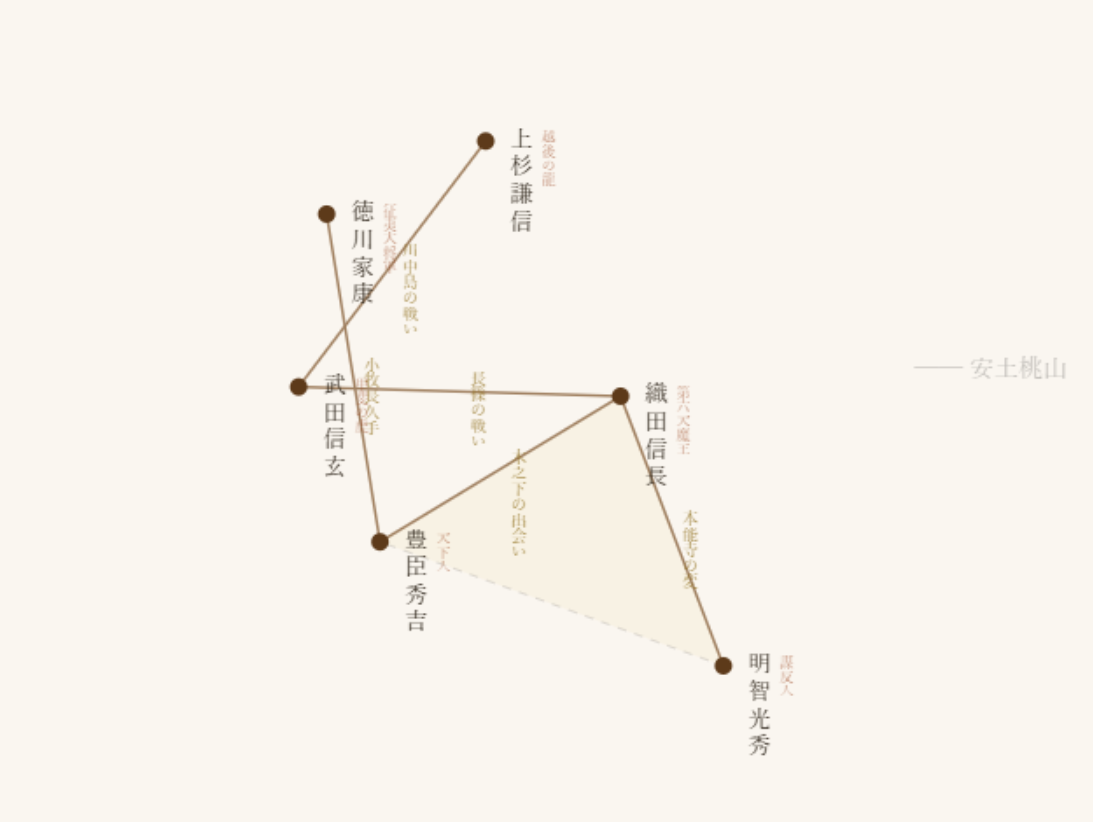
描画ループの最後に以下を追加するだけです。
// draw() 関数の最後に追加
function draw() {
// ... 今までの描画処理 ...
// === Canvasを画像として保存 ===
const link = document.createElement('a');
link.download = '戦国武将相関図.png';
link.href = canvas.toDataURL('image/png');
link.click();
}
または、ボタンで保存する方が実用的:
// HTMLに保存ボタンを追加
const saveBtn = document.createElement('button');
saveBtn.textContent = '📷 画像保存';
saveBtn.style.cssText = 'position:fixed;top:20px;right:20px;padding:10px 20px;z-index:100';
document.body.appendChild(saveBtn);
saveBtn.onclick = () => {
const link = document.createElement('a');
link.download = '人物相関図_' + new Date().toISOString().slice(0,10) + '.png';
link.href = canvas.toDataURL('image/png');
link.click();
};
方法② 高解像度で書き出し(retina / 印刷用)
function exportHighRes() {
const scale = 2; // 2倍の解像度
const w = canvas.width;
const h = canvas.height;
// 一時的な高解像度canvasを作成
const tempCanvas = document.createElement('canvas');
tempCanvas.width = w * scale;
tempCanvas.height = h * scale;
const tempCtx = tempCanvas.getContext('2d');
// 高解像度で描画し直す(再描画処理が必要)
tempCtx.scale(scale, scale);
drawToContext(tempCtx); // 描画関数を分離しておく
// 保存
const link = document.createElement('a');
link.download = '人物相関図_高解像度.png';
link.href = tempCanvas.toDataURL('image/png');
link.click();
}
方法③ JPEG / WebP で軽量化して保存
// JPEG(品質90%)
canvas.toDataURL('image/jpeg', 0.9);
// WebP(品質80%、ファイルサイズ小)
canvas.toDataURL('image/webp', 0.8);
方法④ サーバーサイドでNode.jsで出力する場合
もし**Node.js環境(Puppeteer / node-canvas)**で動かしているなら:
// Puppeteerでヘッドレスブラウザ経由
const puppeteer = require('puppeteer');
const browser = await puppeteer.launch();
const page = await browser.newPage();
await page.setContent(htmlCode);
await page.screenshot({ path: 'output.png', fullPage: true });
実際の使用イメージ(完全版スニペット)
先ほどのコードに保存ボタン機能を追加した完全版:
<!DOCTYPE html>
<html>
<head>
<meta charset="UTF-8">
<title>D3 Canvas 戦国武将相関図</title>
<style>
body { margin:0; background:#f5f0e8; display:flex; justify-content:center; align-items:center; height:100vh; flex-direction:column; }
canvas { box-shadow:0 4px 20px rgba(0,0,0,0.1); border-radius:4px; }
.toolbar { margin-top:15px; display:flex; gap:10px; }
.toolbar button {
padding:8px 20px; background:#5d3a1a; color:#fff; border:none;
border-radius:4px; cursor:pointer; font-family:"Yu Mincho",serif; font-size:14px;
}
.toolbar button:hover { background:#7a4e28; }
</style>
</head>
<body>
<canvas id="canvas" width="900" height="650"></canvas>
<div class="toolbar">
<button onclick="saveAsPNG()">📷 PNGで保存</button>
<button onclick="saveAsJPEG()">🖼 JPEGで保存</button>
</div>
<script src="https://d3js.org/d3.v7.min.js"></script>
<script>
const canvas = document.getElementById('canvas');
const ctx = canvas.getContext('2d');
const width = 900, height = 650;
// ===== データ(省略:先ほどのnodes, linksをそのまま) =====
const nodes = [
{ id: '織田信長', era: '安土桃山', epithet: '第六天魔王', mark: '◉' },
{ id: '豊臣秀吉', era: '安土桃山', epithet: '天下人', mark: '♰' },
{ id: '徳川家康', era: '江戸', epithet: '征夷大将軍', mark: '❀' },
{ id: '明智光秀', era: '安土桃山', epithet: '謀反人', mark: '△' },
{ id: '武田信玄', era: '戦国', epithet: '甲斐の虎', mark: '◇' },
{ id: '上杉謙信', era: '戦国', epithet: '越後の龍', mark: '卍' },
];
const links = [
{ source: '織田信長', target: '豊臣秀吉', episode: '木之下の出会い' },
{ source: '織田信長', target: '明智光秀', episode: '本能寺の変' },
{ source: '豊臣秀吉', target: '徳川家康', episode: '小牧長久手' },
{ source: '武田信玄', target: '上杉謙信', episode: '川中島の戦い' },
{ source: '武田信玄', target: '織田信長', episode: '長篠の戦い' },
];
// ===== 縦書き関数 =====
function drawVerticalText(ctx, text, x, y, opts = {}) {
const { fontSize = 13, color = '#2c2318', spacing = 1.25,
fontFamily = '"Yu Mincho","BIZ UDMincho","Noto Serif CJK JP",serif',
align = 'left', opacity = 1 } = opts;
ctx.save();
ctx.globalAlpha = opacity;
ctx.textAlign = align;
ctx.textBaseline = 'top';
ctx.fillStyle = color;
ctx.font = `${fontSize}px ${fontFamily}`;
const step = fontSize * spacing;
const startY = align === 'center' ? y - (text.length * step) / 2 + step / 2 : y;
for (let i = 0; i < text.length; i++) {
const ch = text[i];
if (/[a-zA-Z0-9]/.test(ch)) {
ctx.save();
ctx.translate(x, startY + i * step + fontSize / 2);
ctx.rotate(Math.PI / 2);
ctx.textAlign = 'center';
ctx.textBaseline = 'middle';
ctx.fillText(ch, 0, 0);
ctx.restore();
} else {
ctx.fillText(ch, x, startY + i * step);
}
}
ctx.restore();
}
// ===== Force Simulation =====
const simulation = d3.forceSimulation(nodes)
.force('link', d3.forceLink(links).id(d => d.id).distance(160))
.force('charge', d3.forceManyBody().strength(-250))
.force('center', d3.forceCenter(width / 2, height / 2))
.force('collision', d3.forceCollide(50))
.on('tick', draw);
// ===== メイン描画 =====
function draw() {
ctx.clearRect(0, 0, width, height);
// 背景
ctx.fillStyle = '#faf6f0';
ctx.fillRect(0, 0, width, height);
// 時代エリア
const eras = ['戦国', '安土桃山', '江戸'];
const eraColors = {
'戦国': 'rgba(139, 69, 19, 0.06)',
'安土桃山': 'rgba(218, 165, 32, 0.06)',
'江戸': 'rgba(46, 139, 87, 0.06)',
};
const eraPos = {
'戦国': { x: width - 80, y: 20 },
'安土桃山': { x: width - 110, y: height / 2 - 20 },
'江戸': { x: width - 70, y: height - 30 },
};
eras.forEach(era => {
const eraNodes = nodes.filter(n => n.era === era);
const pts = eraNodes.map(n => [n.x, n.y]);
const hull = d3.polygonHull(pts);
if (hull) {
ctx.beginPath();
ctx.moveTo(hull[0][0], hull[0][1]);
for (let i = 1; i < hull.length; i++) ctx.lineTo(hull[i][0], hull[i][1]);
ctx.closePath();
ctx.fillStyle = eraColors[era];
ctx.fill();
ctx.strokeStyle = 'rgba(0,0,0,0.12)';
ctx.lineWidth = 1;
ctx.setLineDash([5, 5]);
ctx.stroke();
ctx.setLineDash([]);
}
ctx.save();
ctx.font = '14px "Yu Mincho", serif';
ctx.fillStyle = 'rgba(0,0,0,0.25)';
ctx.textAlign = 'right';
ctx.textBaseline = 'top';
ctx.fillText(`── ${era}`, eraPos[era].x, eraPos[era].y);
ctx.restore();
});
// リンク線
links.forEach(link => {
ctx.beginPath();
ctx.moveTo(link.source.x, link.source.y);
ctx.lineTo(link.target.x, link.target.y);
ctx.strokeStyle = '#a08060';
ctx.lineWidth = 1.5;
ctx.stroke();
const mx = (link.source.x + link.target.x) / 2;
const my = (link.source.y + link.target.y) / 2;
drawVerticalText(ctx, link.episode, mx + 6, my - 12, {
fontSize: 9, color: '#8b6914', spacing: 1.0, opacity: 0.8
});
});
// ノード
nodes.forEach(d => {
ctx.beginPath();
ctx.arc(d.x, d.y, 5, 0, Math.PI * 2);
ctx.fillStyle = '#5d3a1a';
ctx.fill();
drawVerticalText(ctx, d.id, d.x + 14, d.y - 8, {
fontSize: 13, color: '#2c2318', spacing: 1.2
});
drawVerticalText(ctx, d.epithet, d.x + 32, d.y - 6, {
fontSize: 8, color: '#a0522d', spacing: 1.0, opacity: 0.7
});
});
}
// ===== 画像保存関数 =====
function saveAsPNG() {
const link = document.createElement('a');
link.download = '戦国武将相関図.png';
link.href = canvas.toDataURL('image/png');
link.click();
}
function saveAsJPEG() {
const link = document.createElement('a');
link.download = '戦国武将相関図.jpg';
link.href = canvas.toDataURL('image/jpeg', 0.92);
link.click();
}
</script>
</body>
</html>