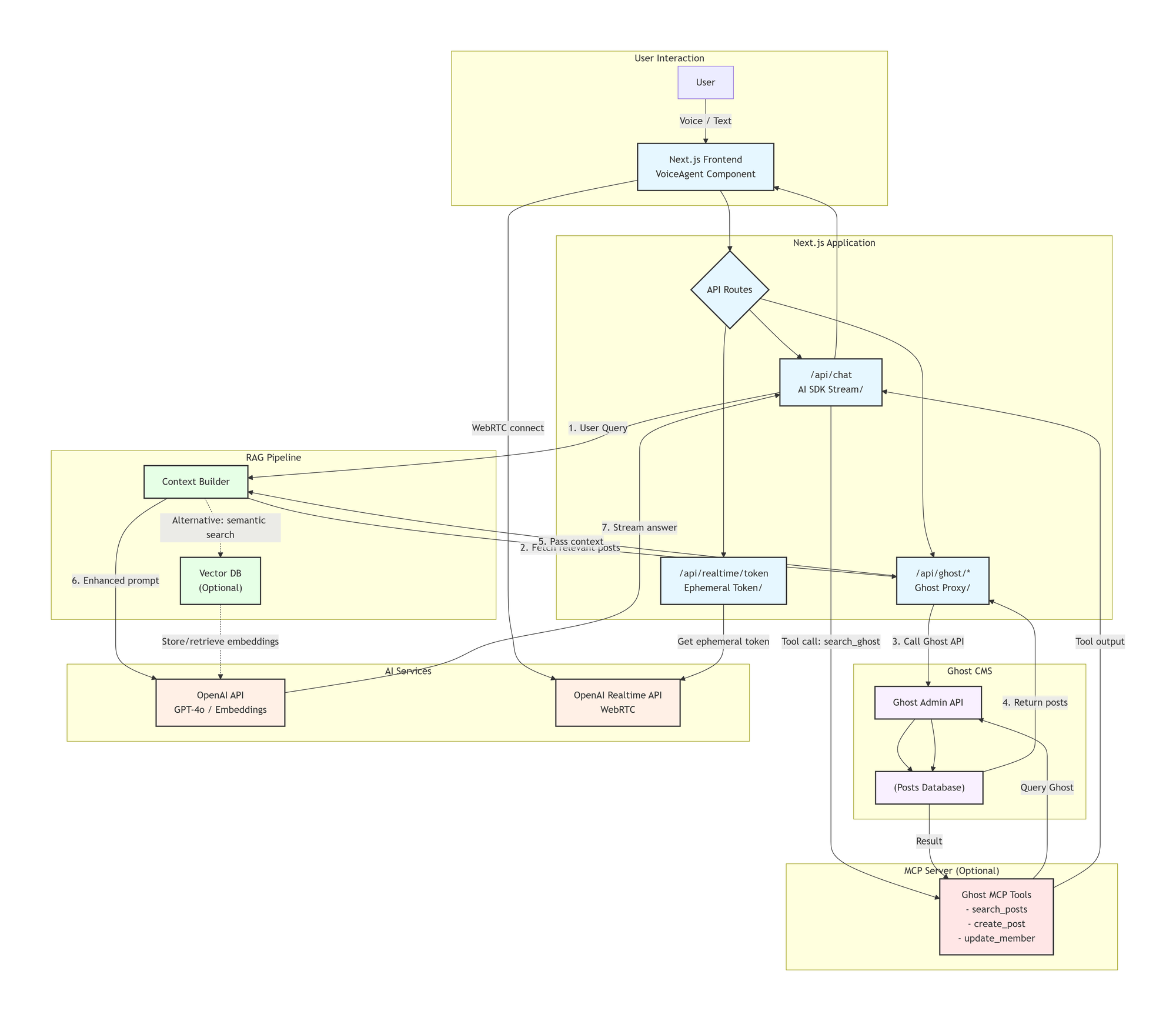
11. AI Agent Vision & Delivery Plan (2026-03-07)
Vision
Build a production-grade AI assistant that acts as a real agent for this product:
- understands live frontend context (
home,editor,article,viewer) - answers questions from trusted project knowledge (Ghost posts/pages/files) with citations
- can execute approved tools and MCP tools safely
- supports controlled content workflows (draft assist first, write actions with confirmation)
Target Architecture
- Keep
/api/ai/chat/uias the single chat entrypoint. - Add agent runtime modules:
runtime(orchestration)tools(local app tools)mcp(MCP connectors + allowlist)rag(indexing/retrieval/rerank)policy(auth, role, scope, safety)
- Keep existing usage logging and extend with tool/retrieval counts.
Execution Plan (Milestones)
-
M1: Frontend Context-Aware Chat
- Pass
page_contextfrom frontend on each request. - Include route type, entity IDs, group scope, locale, optional editor draft snapshot.
- Agent answers based on current page even without RAG.
- Pass
-
M2: Local Tool Calling (Read-only first)
- Implement typed local tools with
zod. - First tools:
get_current_page_context,search_posts,get_post_by_id,get_page_by_id. - Enforce auth and group scope in tool layer.
- Implement typed local tools with
-
M3: RAG for Ghost Content
- Build ingestion pipeline for posts/pages/files.
- Chunk + embed + store vectors with metadata (
group_id,visibility,updated_at,locale). - Add retriever + reranker and citation output.
-
M4: MCP Integration
- Add MCP server registry + tool allowlist policy.
- Add timeout/retry/circuit-breaker.
- Add audit logs for each MCP call.
-
M5: Safe Action Tools
- Add draft-assist tools first.
- Add explicit user confirmation for mutations.
- Keep publish/delete behind stricter role policy.
-
M6: UX + Operations
- Add agent mode selector in
SiteAssistantPanel. - Add tool trace + citations panel.
- Add admin controls for provider/model/tool toggles.
- Add agent mode selector in
Step Tasks (Run One by One)
-
Task A: Context Envelope
- Frontend: include
page_contextin chat request body. - Backend: parse and validate
page_context. - Done when assistant can answer "what page am I on now?"
- Frontend: include
-
Task B: Tool Registry
- Add tool registry and run tool-calling loop.
- Implement first read-only tools.
- Done when assistant can fetch current post/page details via tool calls.
-
Task C: RAG MVP
- Add indexing job + retrieval endpoint/tool.
- Return citations in AI response.
- Done when assistant answers content questions with source links/snippets.
-
Task D: MCP MVP
- Add one MCP server with allowlisted tools.
- Add logs and failure handling.
- Done when one MCP tool can be called from agent safely.
-
Task E: Safe Write Actions
- Add draft-editing tools behind confirmation.
- Done when assistant can propose/apply draft changes without direct publish.
Suggested Repo File Layout
- Frontend:
apps/host/src/components/ai/SiteAssistantPanel.tsx(agent mode UI, traces)apps/host/src/app/ClientLayout.tsx(page context provider)apps/host/src/types/ai.ts(agent request/response types)
- Backend API:
apps/host/src/app/api/ai/chat/ui/route.ts(entrypoint)apps/host/src/app/api/ai/agent/runtime.tsapps/host/src/app/api/ai/agent/tools/*apps/host/src/app/api/ai/agent/rag/*apps/host/src/app/api/ai/agent/mcp/*
- Ghost backend (if needed for persistent indexing/audit):
- add dedicated endpoints/models for RAG docs/chunks and tool logs.
Definition of Done
- Assistant is context-aware per page and group.
- Assistant answers project content questions with citations.
- Tool + MCP calls are permissioned and audited.
- No cross-group leakage.
- Usage/quotas include source + tool/retrieval visibility.
12. Voice Agent Vision (Senior Care Helper) (2026-03-07)
Vision Extension
Add voice interaction so users, especially senior people, can talk naturally with the assistant for daily support:
- easy spoken interaction (hands-free, large-button UX)
- medication and routine reminders
- simple wellbeing check-ins
- practical life guidance with calm, short responses
- safe escalation guidance for urgent situations
Scope and Safety Boundaries
- This is a support assistant, not a medical diagnosis system.
- For emergency symptoms (e.g., chest pain, breathing difficulty, stroke signs), always advise immediate local emergency contact.
- Health suggestions must be conservative, explain uncertainty, and recommend consulting licensed professionals.
- Never claim to replace doctors or prescribe treatment plans autonomously.
Voice Architecture
- Input: microphone -> STT endpoint (
/api/ai/stt). - Agent runtime: same orchestration path as text (
/api/ai/chat/uiwith agent mode). - Output: assistant text -> TTS endpoint (
/api/ai/tts) -> playback. - Optional: duplex/realtime mode later via
/api/ai/realtime/session.
Senior-Friendly UX Requirements
- Large touch targets for
Speak,Stop,Repeat,Help. - Slow/clear TTS options:
- speech speed presets (
slow,normal) - male/female voice options
- speech speed presets (
- Confirmation flow for important actions:
- "Do you want me to set this reminder now?"
- One-tap "Call family/help contact" shortcut (if enabled by user settings).
- Conversation summaries in simple language.
Initial Voice Use Cases (Phase 1)
- Daily reminders:
- medication time
- hydration
- sleep routine
- General support:
- explain article/page content by voice
- answer "what did I write/publish?"
- Gentle wellbeing prompts:
- mood check-in
- activity reminder
Implementation Tasks (Voice Track)
-
V1: Voice UI in Assistant Panel
- add mic button and recording state in
SiteAssistantPanel.tsx - send audio to
/api/ai/stt - inject transcript into message input
- add mic button and recording state in
-
V2: Speak Back Responses
- add "play response" button
- call
/api/ai/ttsfor assistant text - add stop/replay controls
-
V3: Voice Agent Mode
- add
interaction_mode: "text" | "voice"in request body/types - tune prompts for short spoken responses
- add
-
V4: Safety Prompt Pack for Senior Care
- add safety system instructions for health-related prompts
- add emergency trigger phrases and safe fallback responses
-
V5: Reminder Tools
- add local tools:
create_reminder,list_reminders,cancel_reminder - require explicit confirmation before save/delete
- add local tools:
-
V6: Observability
- log STT/TTS latency and failures
- include voice usage in quotas/usage dashboard
Additional Definition of Done (Voice)
- User can complete a full voice roundtrip (speak -> answer spoken back).
- Response style is concise and clear for spoken comprehension.
- Emergency health queries always return safe escalation guidance.
- Reminder actions require confirmation and are auditable.