Custom API説明ファイル:
Discription how to add custom table and related API to Ghost. The steps including
- add knex migration file,
- model of bookself extend,
- API controller for Ghost Server endpoint,
- API Routes for Ghost web routes.
- Other related files to be changed
- How add custom API to Ghost
- Install or update custom packages
- Purpose
- Create Model core/server/models/
- Create API Controller core/server/api/endpoints
- API Routes core/server/web/api/endpoints/admin/
- Other files
- Summary of related files
- API Test
- Change table of Ghost post
- Add count of follow, followed to user GET result
- Project build
- Customed Admin API
Install or update custom packages
-
Custom ghost base version of Ghost 5.115.0
-
Node version
nvm use v20.19.0
- install
yalcto reference local package
npm i yalc -g or yarn global add yalc
- Clone GhostSDK custom package
clone https://github.com/aidabo/Ghost-SDK.git
- Publish
admin-api-schemaas local yalc package
cd GhostSDK/packages/admin-api-schema
yalc publish --private
- Clone Ghost customed version
clone https://github.com/aidabo/Ghost-SDK.git -b v5.115.1-next
yalc add @tryghost/admin-api-schema
- Change your
cocnfig.development.json
ghost/core/core/shared/config/env/config.development.json
- Install packages and build
cd Ghost
yarn fix
yarn build
- Run
yarn dev or yarn dev:debug
- Run migration js if updated
Delete from migration files from migrations table
Run knex-migrator
cd Ghost
yarn knex-migrator migrate
Purpose
- Create table
social_bookmarks - Create API to query, read, add, delete table social_booknarks
- POST: /ghost/api/admin/social/bookmarks/
{ "socialbookmarks": [ { "post_id": "67fc90513336d884cbd8c6cc", "user_id": "1" } ] } - Create permissions for specified Ghost roles
Migration file path: ghost/core/core/server/data/migrations/versions/5.115/2025-04-01-21-00-03-add-social-bookmarks-permissions.js
Object value of object: 'socialbookmark' in permissions is the same of export name of social-bookmarks.js, but ignore upper-lower case.
TODO: Role check: User owner and administrator or editor can delete bookmarks
const {combineTransactionalMigrations, addPermissionWithRoles} = require('../../utils');

module.exports = combineTransactionalMigrations(
    addPermissionWithRoles({
        name: 'Browse Bookmarks',
        action: 'browse',
        object: 'socialbookmark'
    }, ['Administrator', 'Editor', 'Author']),
    addPermissionWithRoles({
        name: 'Read Bookmarks',
        action: 'read',
        object: 'socialbookmark'
    }, ['Administrator', 'Editor', 'Author']),
    addPermissionWithRoles({
        name: 'Add Bookmarks',
        action: 'add',
        object: 'socialbookmark'
    }, ['Administrator', 'Editor', 'Author']),
    addPermissionWithRoles({
        name: 'Delete Bookmarks',
        action: 'destroy',
        object: 'socialbookmark'
    }, ['Administrator', 'Editor', 'Author'])
);
Add table definition into schema.js
Ghost some validation use schema.js to validate table, so besides of migration js file, you need add the same declaration of table into schema.js.
schema.js path is ghost/core/core/server/data/schema/schema.js.
    social_bookmarks: {
        id: {type: 'string', maxlength: 24, nullable: false, primary: true},
        user_id: {type: 'string', maxlength: 24, nullable: false, unique: false, references: 'users.id', cascadeDelete: true},
        post_id: {type: 'string', maxlength: 24, nullable: false, unique: false, references: 'posts.id', cascadeDelete: true},
        created_at: {type: 'dateTime', nullable: false},
        created_by: {type: 'string', maxlength: 24, nullable: false},
        '@@UNIQUE_CONSTRAINTS@@': [
            ['user_id', 'post_id']
        ]
    },
Run knex migration
Run migration command to create table.
yarn knex migrator migrate
Create Model (core/server/models/)
Ghost model use bookshelf framework, just extend it as ghost/core/core/server/models/social-bookmarks.js.
const ObjectId = require('bson-objectid').default;
const ghostBookshelf = require('./base');
const errors = require('@tryghost/errors');
const models = require('./index');
const debug = require('@tryghost/debug')('models');
const SocialBookmark = ghostBookshelf.Model.extend({
    tableName: 'social_bookmarks',

    defaults() {
        return {
            id: ObjectId().toHexString()
        };
    },

    user() {
        return this.belongsTo('User', 'user_id');
    },

    post() {
        return this.belongsTo('Post', 'post_id');
    },

    initialize() {
        // @ts-ignore
        ghostBookshelf.Model.prototype.initialize.call(this);
        this.on('saving', this.validateFields);
    },

    async validateFields(model) {
        const postId = model.get('post_id');
        const userId = model.get('user_id');

        if (!postId) {
            throw new errors.ValidationError({message: '`post_id` is required.'});
        }

        if (!userId) {
            throw new errors.ValidationError({message: '`user_id` is required.'});
        }

        // @ts-ignore
        const post = await models.Post.findOne({id: postId}, {withRelated: ['authors']});
        if (!post) {
            throw new errors.NotFoundError({message: `Post with ID ${postId} not found.`});
        }

        // @ts-ignore
        const user = await models.User.findOne({id: userId});
        if (!user) {
            throw new errors.NotFoundError({message: `User with ID ${userId} not found.`});
        }

        const postAuthorId = post.related('authors').find(author => author.id === userId);
        if (postAuthorId) {
            throw new errors.ValidationError({message: `Users cannot bookmark their own posts.`});
        }
    }
});

module.exports = {
    SocialBookmark: ghostBookshelf.model('SocialBookmark', SocialBookmark)
};
Create API Controller (core/server/api/endpoints)
API Controller file is server entry point, create ghost/core/core/server/api/endpoints/social-bookmarks.js.
Create API Controller
const tpl = require('@tryghost/tpl');
const errors = require('@tryghost/errors');
const models = require('../../models');
const logging = require('@tryghost/logging');
const ALLOWED_INCLUDES = [];

const messages = {
    bookmarkNotFound: 'Bookmark not found.',
    duplicateBookmark: 'Bookmark already exists for this post and user.'
};

/** @type {import('@tryghost/api-framework').Controller} */
const controller = {
    docName: 'socialbookmarks',

    browse: {
        headers: {
            cacheInvalidate: false
        },
        options: [
            'include',
            'page',
            'limit',
            'fields',
            'filter',
            'order',
            'debug'
        ],
        validation: {
            options: {
                include: ALLOWED_INCLUDES
            }
        },
        permissions: true,
        query(frame) {
            return models.SocialBookmark.findPage(frame.options);
        }

    },

    read: {
        headers: {cacheInvalidate: false},
        options: ['include'],
        data: ['id', 'user_id', 'post_id'],
        permissions: true,
        query(frame) {
            return models.SocialBookmark.findOne(frame.data, frame.options)
                .then((bookmark) => {
                    if (!bookmark) {
                        return Promise.reject(new errors.NotFoundError({
                            message: tpl(messages.bookmarkNotFound)
                        }));
                    }
                    return bookmark;
                });
        }
    },

    add: {
        statusCode: 201,
        headers: {cacheInvalidate: false},
        options: ['include'],
        data: ['post_id'],
        permissions: true,
        async query(frame) {
            try {
                // @ts-ignore
                return await models.SocialBookmark.add(frame.data.bookmarks[0], frame.options);
            } catch (err) {
                logging.error(err);
                if (err.code === 'ER_DUP_ENTRY') {
                    throw new errors.InternalServerError({
                        message: tpl(messages.duplicateBookmark, frame.data.bookmarks)
                    });
                }
                throw err;
            }
        }
    },

    destroy: {
        statusCode: 204,
        headers: {cacheInvalidate: false},
        options: ['id'],
        permissions: true,
        query(frame) {
            // @ts-ignore
            return models.SocialBookmark.destroy({...frame.options, require: true});
        }
    }
};

module.exports = controller;
Above Add has data structure of frame.data.bookmarks[0], so only add one record, no bulk processing. json file as following.
            {
                "bookmarks": [
                    {
                        "post_id": "67fc90513336d884cbd8c6cc",
                        "user_id": "1"
                    }
                ]
            }
Create API Controller (/core/server/api/endpoints)
Add API Controller declaration into ghost/core/core/server/api/endpoints/index.js.
    //custom added
    get socialBookmarks() {
        return apiFramework.pipeline(require('./social-bookmarks'), localUtils);
    },
API Routes (core/server/web/api/endpoints/admin/)
Append routes and API Controller mapping
ghost/core/core/server/web/api/endpoints/admin/routes.js
ghost/core/core/server/web/api/endpoints/admin/custom-routes.js
To add new routing information in web routes.js, modify routes.js as following.
In routes.js
customApi(router);
In new file of custom-routes.js
const api = require('../../../../api').endpoints;
const {http} = require('@tryghost/api-framework');
const mw = require('./middleware');

/**
 * @returns {import('express').Router}
 */
module.exports = function customApiRoutes(router) {
    // Bookmarks
    router.get('/social/bookmarks', mw.authAdminApi, http(api.socialBookmarks.browse));
    router.get('/social/bookmarks/:id', mw.authAdminApi, http(api.socialBookmarks.read));
    router.post('/social/bookmarks', mw.authAdminApi, http(api.socialBookmarks.add));
    router.del('/social/bookmarks/:id', mw.authAdminApi, http(api.socialBookmarks.destroy));

    return router;
};
The name of socialBookmarks in api.socialBookmarks.browse must be the same as API Controller declaration in index.js API Ccontroller
ghost/core/core/server/api/endpoints/index.js
   get socialBookmarks() {
        return apiFramework.pipeline(require('./social-bookmarks'), localUtils);
    },
Append Routes to allowlisted
Append routes to allowlisted of ghost/core/core/server/web/api/endpoints/admin/middleware.js.
social: ['GET', 'POST', 'DELETE', 'PUT']
const allowlisted = {
        //Ghost http route
        //Added custom route
        social: ['GET', 'POST', 'DELETE', 'PUT']
    };
Other files
Modify file of ghost/api-framework/lib/validators/input/all.js to add routes path of socialbookmark to permission check function.
['posts', 'tags'] -> ['posts', 'tags', 'social']
// NOTE: this block should be removed completely once JSON Schema validations
        //       are introduced for all of the endpoints
        if (!['posts', 'tags', 'social'].includes(apiConfig.docName)) {
            if (_.isEmpty(frame.data) || _.isEmpty(frame.data[apiConfig.docName]) || _.isEmpty(frame.data[apiConfig.docName][0])) {
                return Promise.reject(new BadRequestError({
                    message: tpl(messages.noRootKeyProvided, {docName: apiConfig.docName})
                }));
            }
        }
Summary of related files
| Functions | New/Modify | File |
|---|---|---|
| Table | New | ghost/core/core/server/data/migrations/versions/5.115/2025-04-01-21-00-02-add-social-bookmarks-table.js |
| New | ghost/core/core/server/data/migrations/versions/5.115/2025-04-01-21-00-03-add-social-bookmarks-permissions.js | |
| Append | ghost/core/core/server/data/schema/schema.js | |
| Model | New | ghost/core/core/server/models/social-bookmarks.js |
| API Controller | New | ghost/core/core/server/api/endpoints/social-bookmarks.js |
| Append | ghost/core/core/server/api/endpoints/index.js | |
| Modify | ghost/api-framework/lib/validators/input/all.js | |
| API Routes | Append | ghost/core/core/server/web/api/endpoints/admin/routes.js |
| New | ghost/core/core/server/web/api/endpoints/admin/custom-routes.js | |
| Modify | ghost/core/core/server/web/api/endpoints/admin/middleware.js |
API Test
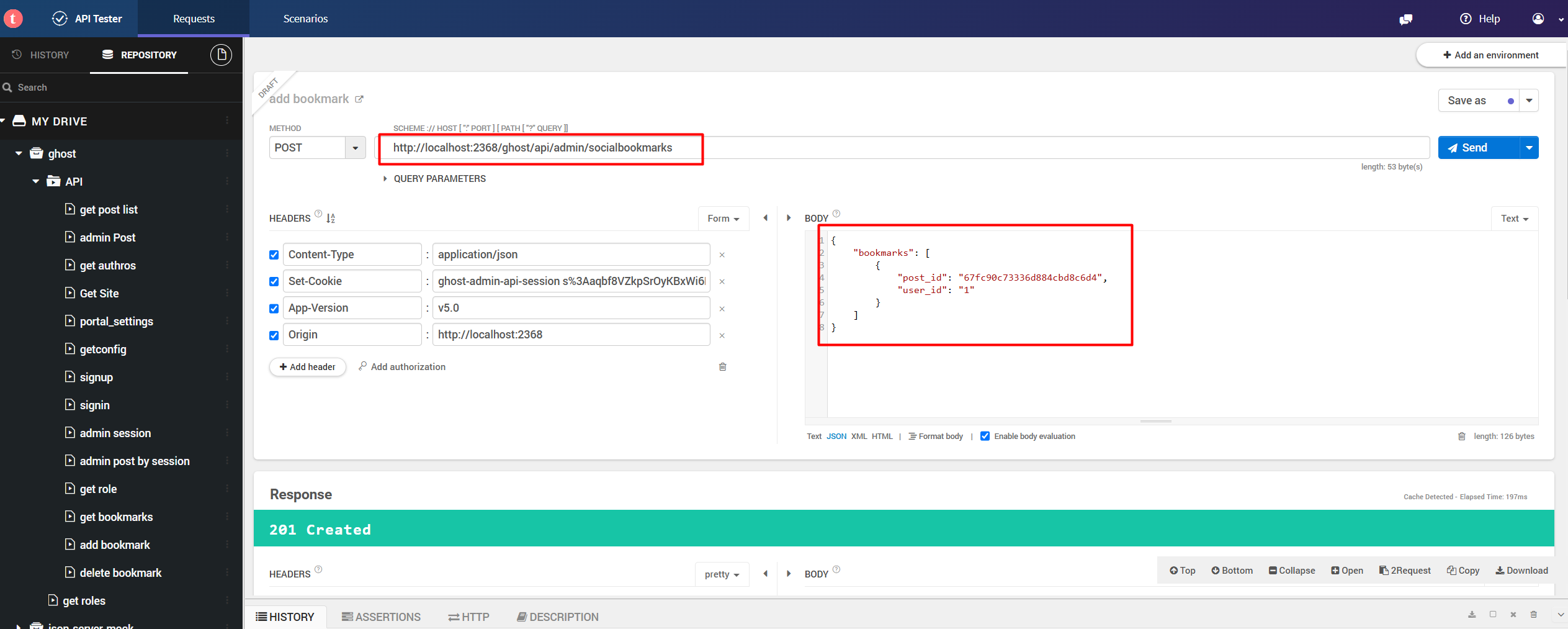
- Add bookmarks
curl -i -X POST \
   -H "Content-Type:application/json" \
   -H "Set-Cookie:ghost-admin-api-session s%3Aaqbf8VZkpSrOyKBxWi6PGqRbgc4NizE4.UKUK0AIWDnImNdo2k2Tgs8s4nVqR%2BD6EeQ3sHDOld78; pma_lang=ja" \
   -H "App-Version:v5.0" \
   -H "Origin:http://localhost:3000" \
   -d \
'{
    "socialbookmarks": [
        {
            "post_id": "67fc94573336d884cbd8c6e1",
            "user_id": "1"
        }
    ]
}' \
 'http://localhost:2368/ghost/api/admin/social/bookmarks'
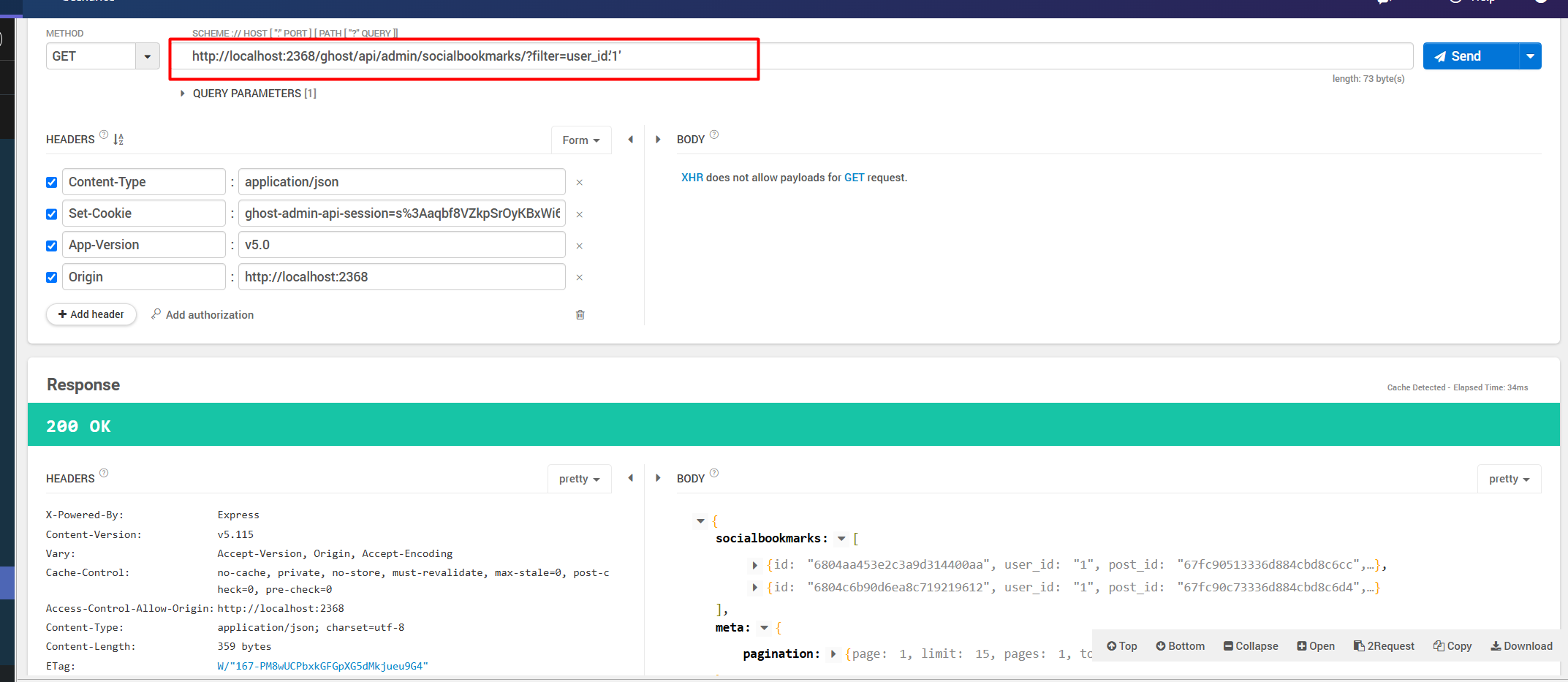
- Get bookmarks
curl -i -X GET \
   -H "Content-Type:application/json" \
   -H "Set-Cookie:ghost-admin-api-session=s%3Aaqbf8VZkpSrOyKBxWi6PGqRbgc4NizE4.UKUK0AIWDnImNdo2k2Tgs8s4nVqR%2BD6EeQ3sHDOld78; pma_lang=ja" \
   -H "App-Version:v5.0" \
   -H "Origin:http://localhost:3000" \
 'http://localhost:2368/ghost/api/admin/social/bookmarks/'
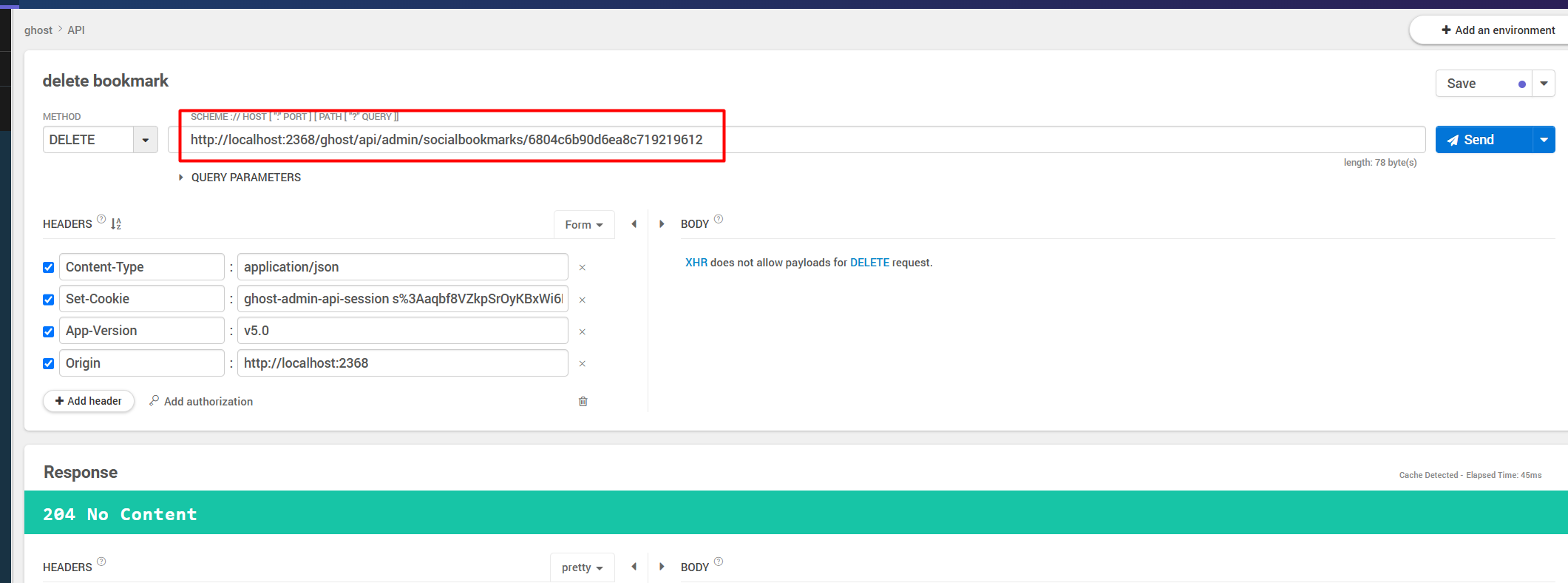
- Delete bookmarks
curl -i -X DELETE \
   -H "Content-Type:application/json" \
   -H "Set-Cookie:ghost-admin-api-session s%3Aaqbf8VZkpSrOyKBxWi6PGqRbgc4NizE4.UKUK0AIWDnImNdo2k2Tgs8s4nVqR%2BD6EeQ3sHDOld78; pma_lang=ja" \
   -H "App-Version:v5.0" \
   -H "Origin:http://localhost:3000" \
 'http://localhost:2368/ghost/api/admin/social/bookmarks/681729966a103f48b96844ff'
Change table of Ghost post
Add a group_id column into posts table.
group_id: {type: 'string', maxlength: 24, nullable: true, references: 'social_groups.id', cascadeDelete: true},
Add group_id filter to post GET API
Now https://localhost:2368/ghost/api/admin/posts/ work as original default but except posts not in group.
https://localhost:2368/ghost/api/admin/filter=group_id:00000000000000 will search posts in group 00000000000000.
curl -i -X GET \
   -H "Content-Type:application/json" \
   -H "App-Version:v5.0" \
   -H "Origin:http://localhost:3000" \
   -H "Set-Cookie:ghost-admin-api-session=s%3Aaqbf8VZkpSrOyKBxWi6PGqRbgc4NizE4.UKUK0AIWDnImNdo2k2Tgs8s4nVqR%2BD6EeQ3sHDOld78; pma_lang=ja" \
 'http://localhost:2368/ghost/api/admin/posts/?filter=group_id%3A'6815be9dfc8b03b493c74aa2''

```json res
{
    "posts": [
        {
            "id": "6817489008df5488c4018e21",
            "uuid": "09e56898-16f7-41f6-a312-63c24ea4c5e3",
            "title": "this is video of groupQQQQQ",
            ...,
            "group_id": "6815be9dfc8b03b493c74aa2",
            ...,

}
Add counts of bookmarks, favors, forwards, and posts in group to post GET result
            ...
            "group_id": null,
            ...
            "count": {
                "groups": 0,
                "bookmarks": 0,
                "favors": 0,
                "forwards": 0,
                ...
            },
curl -i -X GET \
   -H "Content-Type:application/json" \
   -H "App-Version:v5.0" \
   -H "Origin:http://localhost:3000" \
   -H "Set-Cookie:ghost-admin-api-session=s%3Aaqbf8VZkpSrOyKBxWi6PGqRbgc4NizE4.UKUK0AIWDnImNdo2k2Tgs8s4nVqR%2BD6EeQ3sHDOld78; pma_lang=ja" \
 'http://localhost:2368/ghost/api/admin/posts/6815c12cfc8b03b493c74aab/'
{
    "posts": [
        {
            "id": "6815c12cfc8b03b493c74aab",
            "uuid": "4aa80590-0f71-4cd9-9989-95f02ba6a126",
            "title": "Hello World X008",
            "slug": "hello-world-x008",
            ...,
            "count": {
                "groups": 0,
                "bookmarks": 0,
                "favors": 0,
                "forwards": 0,
                "clicks": 0,
                "positive_feedback": 0,
                "negative_feedback": 0
            },
    ]
}
Add count of follow, followed to user GET result
Specified count in include options
http://localhost:2368/ghost/api/admin/users/?include=count.follow,permissions,roles,count.followed
curl -i -X GET \
   -H "Content-Type:application/json" \
   -H "App-Version:v5.0" \
   -H "Origin:http://localhost:3000" \
   -H "Set-Cookie:ghost-admin-api-session=s%3Aaqbf8VZkpSrOyKBxWi6PGqRbgc4NizE4.UKUK0AIWDnImNdo2k2Tgs8s4nVqR%2BD6EeQ3sHDOld78; pma_lang=ja" \
 'http://localhost:2368/ghost/api/admin/users/?include=count.follow%2Cpermissions%2Croles%2Ccount.followed'
    ...
    "count":{
        "followed": 0,
        "follow": 0
    },
    ...
Project build
Ghost core project is js-based except individual ts, run yarn to make sure referenced package exists. That's all right.
yarn or yarn install
yarn build
yarn dev
Customed Admin API
http://localhost:2368/ghost/api/admin/social/**
Custom API summary
| API name | API Name JA | API routes | Comments |
|---|---|---|---|
| boomarks | 收藏 | GET: social/bookmarks/ | |
| GET: social/bookmarks/:id/ | |||
| POST:social/bookmarks | |||
| DELETE: social/bookmarks/:id | |||
| favors | 点赞 | GET: social/favors/ | |
| GET: social/favors/:id/ | |||
| POST:social/favors | |||
| DELETE: social/favors/:id | |||
| follows | 关注 | GET: social/follows/ | |
| GET: social/follows/:id/ | |||
| POST:social/follows | |||
| DELETE: social/follows/:id | |||
| forwards | 转发 | GET: social/fowards/ | |
| GET: social/forwards/:id/ | |||
| POST:social/forwards | |||
| DELETE: social/forwards/:id | |||
| groups | 群 | GET: social/groups/ | type: [ 'family', 'company', 'private', 'public', 'secret'] status: ['approval', 'active', 'archived'] |
| GET: social/groups/:id/ | |||
| POST:social/groups | |||
| DELETE: social/groups/:id | |||
| PUT: social/groups/:id | |||
| members | 群成员 | GET: social/members/ | roles: ['Social Group Owner', 'Social Group Admin', 'Social Group Member'] status: ['active', 'archived', 'disabled'] |
| GET: social/members/:id/ | |||
| POST:social/members | |||
| DELETE: social/members/:id | |||
| PUT: social/members/:id | |||
| comments | 評価 | GET: social/comments/ | status: ['published', 'hidden', 'deleted'] TODO |
| GET: social/comments/:id/ | |||
| POST:social/comments | |||
| DELETE: social/comments/:id | |||
| PUT: social/comments/:id |
Custom API data structure
- bookmarks
{
    "socialbookmarks": [
        {
            "post_id": "67fc94573336d884cbd8c6e1",
            "user_id": "1"
        }
    ]
}
- favors
{
    "socialfavors": [
        {

            "post_id": "67fc94573336d884cbd8c6e1",
            "user_id": "1"
        }
    ]
}
- follows
{
    "socialfollows": [
        {

            "followed_id": "1",
            "user_id": "6806fb8a4732bea59e0fd64f"
        }
    ]
}
- forwards
{
    "socialforwards": [
        {

            "post_id": "67ee09ada60c82da3c99debc",
            "sender_id": "1",
            "receiver_id": "6806fb8a4732bea59e0fd64f"
        }
    ]
}
- groups
{
    "socialgroups": [
        {

            "creator_id": "67ad7a9447649d00016f24bb",
            "group_name": "My Family_PP99",
            "type": "family",
            "status": "active"
        }
    ]
}
- members
{
    "socialgroupmembers": [
        {

            "group_id": "68118848544a74a3ffd08e0c",
            "user_id": "1",
            "status": "active",
            "role_id": "6811b7db4bdf8765d95ffac4"
        }
    ]
}
- comments
{
    "socialpostcomments": [
        {
               *TODO*
        }
    ]
}
Extend Ghost table
| Table | column | definition |
|---|---|---|
| posts | group_id | group_id: {type: 'string', maxlength: 24, nullable: true, references: 'social_groups.id', cascadeDelete: true}, |
| posts | status | status: {type: 'string', maxlength: 50, nullable: true, validations: {isIn: [['draft', 'published', 'scheduled', 'sent', 'hidden']]}}, |
| posts_revisions | post_status | post_status: {type: 'string', maxlength: 50, nullable: true, validations: {isIn: [['draft', 'published', 'scheduled', 'sent', 'hidden']]}}, |
Extend GhostSDK/admin-api-schema
| ファイル | 修正項目 | 備考 | |
|---|---|---|---|
| post.json | "status": { "type": "string", "enum": ["published", "draft", "scheduled", "sent", "hidden"] }, |
hiddenを追加 | |
| post.json | "group_id": { "type": ["string", "null"], "maxLength": 24 }, |
group_idを追加 |
Extend Ghost post API
| Extend count | Extend Count | URL | 備考 | Role (TODO) |
|---|---|---|---|---|
| GET | count.bookmarks, count.favors, count.forwards, count.groups | |||
| Extend group_id | data | |||
| GET | posts/?filter=group_id:my-group-id | 指定グループの記事を取得する | Administratorとグループ所属ユーザ | |
| POST | {posts:[{group_id: "6815be9dfc8b03b493c74aa2"}]} | グループ所属のユーザ(Owner、Admin、Member) | ||
| PUT | {posts:[{group_id: "6815be9dfc8b03b493c74aa2"}]} | posts/:id/?filter=group_id:my-group-id | Defaultはグループ所属するものが取得しないため、 filterを指定して更新後のデータを取得できるようにする |
Authors |
| Extend hidden status | data | |||
| GET | Extend filter status:'hidden' | posts/?filter=status:'hidden' | グループ記事取得 | hiddenの指定はAdministratorのみ |
| POST | × | 新規記事をHiddenにすることが不可 | 新規の場合、status=hidden不可 | |
| PUT | {posts:[{status: "hidden"}]} | posts/:id/?filter=status:['published', 'hidden'] | 記事をhiddenにする。変更前後のstatusをfilterに指定し、指定順番関係なし。変更前後のstatusがhiddenではない場合、filterの指定不要 | Administrator |
| PUT | {posts:[{status: "draft"}]} | posts/:id/?filter=status:['hidden', 'draft'] | 記事をhiddenから別にする。変更前後のstatusをfilterに指定し、指定順番関係なし。変更前後のstatusがhiddenではない場合、filterの指定不要 | Administrator |
Extend Ghost user API
| Extend | filter & count | URL | 備考 | Role |
|---|---|---|---|---|
| Extend Count | include=count.follow,count.followed | users/?include=count.follow,permissions,roles,count.followed | FollowとFollowedの数を取得 | |
| Extend Group Member &Roles | include=group_members,group_members.role | users/?include=group_members,group_members.role | ユーザ所属グループとロールを取得 |
Extend role data for group
Add three roles about group.
- Social Group Owner
- Social Group Admin
- Social Group Member
All custom migration files
ghost/core/core/server/data/migrations/versions/5.115
2025-04-01-17-00-00-drop-social-tables.js
2025-04-01-18-00-00-add-group-column-to-post.js
2025-04-01-18-00-01-add-index-group-to-post.js
2025-04-01-20-00-00-add-social-group-admin-role.js
2025-04-01-20-00-00-add-social-group-owner-role.js
2025-04-01-20-00-01-add-social-group-member-role.js
2025-04-01-21-00-00-add-social-follows-table.js
2025-04-01-21-00-01-add-social-follows-permissions.js
2025-04-01-21-00-02-add-social-bookmarks-table.js
2025-04-01-21-00-03-add-social-bookmarks-permissions.js
2025-04-01-21-00-04-add-social-favors-table.js
2025-04-01-21-00-05-add-social-favors-permissions.js
2025-04-01-21-00-06-add-social-forwards-table.js
2025-04-01-21-00-07-add-social-forwards-permissions.js
2025-04-01-21-00-10-add-social-groups-table.js
2025-04-01-21-00-11-add-social-groups-permissions.js
2025-04-01-21-00-12-add-social-groups-members-table.js
2025-04-01-21-00-13-add-social-groups-members-permissions.js
2025-04-01-21-00-17-add-social-post-comments-table.js
2025-04-01-21-00-18-add-social-post-comments-permissions.js
2025-04-01-21-01-19-add-social-post-comments-like-table.js
2025-04-01-21-01-20-add-social-post-comments-like-permissions.js
2025-04-01-21-01-21-add-social-post-comments-report-table.js
2025-04-01-21-01-22-add-social-post-comments-report-permissions.js